Tired of fumbling for keys in the dark? Worried about losing your house keys? Want to let in guests remotely while you're at work? Keyless entry door locks solve all these problems, and they're more affordable and easier to install than ever.
Smart lock adoption has climbed steadily across Texas, and it's easy to see why: most Texas homeowners who upgrade tell us they wished they'd done it sooner. But with dozens of options ranging from $80 basic keypads to $400 premium smart locks, how do you choose the right one?
This guide breaks down every type of keyless entry system, compares the best brands for Texas homes, and helps you pick the perfect lock for your needs and budget.
Why Switch to Keyless Entry?
Going keyless is not just about convenience, though that part is real: no lost keys, no fumbling in 100-degree heat while carrying bags from the car. The bigger draw for most Texas homeowners is control. You decide who gets in, when they get in, and you can revoke that access the moment a job is done or a tenant moves out.
The security case is solid. Smart locks plug a gap that traditional locks leave open: the copied key you forgot you gave out, the spare under the doormat, the lock that never auto-closes. These aren't exotic attack vectors - they're exactly how most residential break-ins happen in Austin and San Antonio. A smart lock closes all of them with tamper alerts, a full activity log, temporary codes you can delete when a contractor is done, and auto-lock so the door never stays open by accident.
On the convenience side, Texas summers put a premium on speed. Standing in 105-degree heat, hands full of groceries, hunting for keys is genuinely miserable. Auto-unlock and keypad entry solve that directly. Remote control, voice integration with Alexa or Google, and easy access for kids who memorize a code instead of keeping track of a key round out the day-to-day wins.
5 Types of Keyless Entry Systems
The five main categories of keyless locks each solve a different problem. A landlord who never wants to think about an app needs something completely different from an Airbnb host managing guests in multiple cities. Understanding where each type shines - and where it falls short - saves you from buying the wrong thing.
1. Keypad Deadbolts (No Smart Features) - $80-$150
A keypad deadbolt is the simplest upgrade you can make from a traditional lock. It replaces your existing deadbolt with one that opens via a numeric code rather than a key. There's no WiFi, no app, no hub, and nothing to configure beyond setting your code. For rental properties, vacation homes, or households that just want the key-loss problem to disappear, this is often the right answer.
Most models run on four AA batteries with a backup keyhole in case the battery dies. The keyhole matters in Texas because extreme heat accelerates battery drain, so having that fallback is not just nice to have. Battery life typically runs 6 to 12 months under normal use.
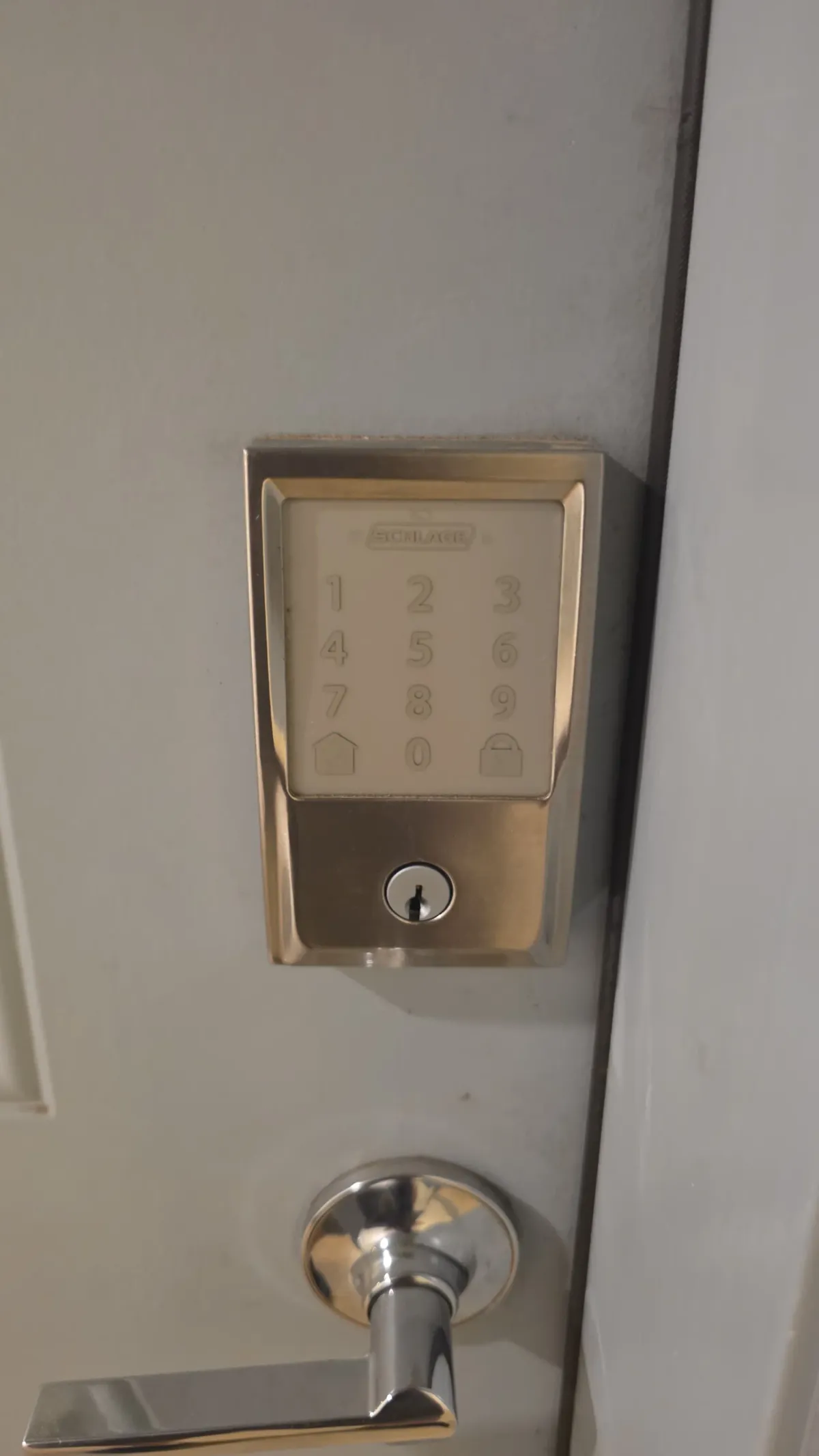
Three models stand out for Texas conditions. The Kwikset SmartCode 913 ($80-$120) offers the best value: 1-touch locking, an angled keypad that's easy to see in bright sun, SmartKey rekey technology so you can rekey yourself in 30 seconds, Grade 2 ANSI/BHMA security, and 30 user codes. The Schlage Camelot ($100-$150) steps up to Grade 1 security (the highest residential rating), a touchscreen with no physical buttons to wear out, auto-lock, and 19 user codes in premium finishes. For humid Gulf Coast conditions, the Yale Real Living ($120-$180) offers a backlit touchscreen, weather-resistant construction, 25 user codes, and a tamper-resistant battery cover.
Keypad deadbolts have a shorter failure surface than smart locks. No app means no app outage. No WiFi dependency means no connectivity issue at the worst possible moment. The tradeoff for that simplicity is no visibility and no remote control - if someone enters your home while you're away, you won't know until you check the door yourself. These locks work best for rental properties, budget-conscious homeowners, simple vacation homes, and anyone who doesn't want an app-based system.
Texas sun is unusually hard on keypad hardware. Physical buttons fade from UV exposure within a few years, while touchscreen models hold up much better. Weather resistance matters everywhere in Texas, but it's especially important along the I-10 corridor from Houston to San Antonio where humidity is consistently high. Specify touchscreen over physical buttons and an IP65 or higher weather-resistance rating when you buy.
2. Smart Locks with WiFi/Bluetooth - $150-$330
Smart locks are internet-connected deadbolts you control from a smartphone. They do everything a keypad deadbolt does, and add remote unlock, virtual keys you can share or expire on a schedule, voice control with Alexa or Google Assistant or Siri, and a full activity log. For most Texas homeowners who want the full keyless experience, this is the category to spend your attention on.
The lock connects to your home WiFi or pairs via Bluetooth, then communicates with a smartphone app over the internet. When you want to let someone in from the office in Austin while they're standing at your front door in Cedar Park, you just tap a button. The lock itself stays battery-powered, so it keeps working through a power outage even if remote access temporarily drops. Always configure a backup keypad code before you rely on the app - a dead phone battery or dropped WiFi connection can complicate entry.
Four models represent the strongest performers we've installed and serviced across Texas. The August Smart Lock Pro ($200-$280) is the easiest DIY install because it replaces only the interior thumb-turn and works with any existing deadbolt. It includes a WiFi bridge for remote access, supports Alexa, Google, and Apple HomeKit, and its auto-unlock geofencing is a genuine quality-of-life improvement for a Texas summer. The Schlage Encode Plus ($250-$330) is the pick for Apple households: built-in WiFi (no hub), Grade 1 security, Apple Home Key support (unlock with your watch), and a touchscreen that holds up to direct sun. The Yale Assure Lock 2 ($200-$280) is Matter-compatible, meaning it works with every major smart home platform without lock-in - good if you're not committed to one ecosystem. The Kwikset Halo ($150-$200) is the budget WiFi option: built-in WiFi, Alexa/Google support, and SmartKey rekeying at the lowest price in the connected category.
The ability to grant and revoke access without being home is the feature most Airbnb hosts and anyone with a regular housekeeper won't want to live without once they've used it. Virtual keys expire automatically, and the activity log keeps a record you can actually reference. These locks are the best fit for tech-savvy homeowners, vacation rental hosts, and anyone who regularly manages access for people outside the household.
3. Biometric (Fingerprint) Locks - $150-$400
Biometric locks scan your fingerprint and unlock in under a second. There's nothing to remember and nothing to carry - your finger is the key. That sounds ideal, and for the right household it genuinely is. But Texas throws a real challenge at fingerprint sensors, and it's worth understanding before you invest in one.
A capacitive or optical sensor reads your fingerprint against a stored template. Most locks hold 50 to 200 fingerprints, so you can enroll the whole family and a few trusted regulars. The scan-to-unlock time is typically well under one second - faster than typing a code by a significant margin.
Of the fingerprint models we've installed across Texas, three stand out. The Ultraloq U-Bolt Pro ($180-$250) is the best overall value: four access methods (fingerprint, keypad, app, key), up to 95 fingerprints, 0.3-second response, and built-in WiFi. The Lockly Vision Elite ($300-$400) is the premium pick if you also want a video doorbell - it integrates a 1080p camera, holds up to 99 fingerprints, and uses a randomizing PeekIn keypad to prevent code observation. The Eufy Security Smart Lock S230 ($200-$280) suits Eufy ecosystem households: 3D fingerprint sensor, Apple Home Key, and integration with Eufy cameras.
Fingerprint entry removes two of the most common access problems in a household with kids: lost keys and forgotten codes. The reliability drawbacks are real, and Texas makes them worse. Sweaty fingers from walking to the car in July, dust from a West Texas front, or a sensor baked in direct afternoon sun can all cause failed reads. The Texas-specific risks - sensor malfunction above 100 degrees, dust clogging the sensor, and humidity-reduced recognition accuracy - apply at most Texas homes for months out of the year. Always choose a model with a keypad backup. Fingerprint locks work best in households with a small, consistent set of users where convenience matters more than the ability to share access with outside people.
Smart lock adoption has grown steadily across Texas as homeowners discover that controlling who gets in - and when - is worth more than the cost of the hardware.
4. Bluetooth/Proximity Locks (Auto-Unlock) - $200-$350
Proximity locks detect your phone's Bluetooth signal as you approach and unlock before you even reach the door. No app to open, no code to type, no fingerprint to scan - the door is simply open when you get there. If you've ever stood in a Texas August afternoon with both arms full of groceries trying to find your keys, you understand why this category exists.
Your phone maintains a Bluetooth connection to the lock within a range of 30 to 50 feet. As you cross the threshold distance, the lock releases. When you leave and the phone moves out of range, the lock re-engages. The entire interaction requires nothing from you.
A few models have earned consistent praise for getting the timing right - not unlocking while you're still in the driveway, and not making you wait at the door. The August Smart Lock Pro ($200-$280) has adjustable auto-unlock range from 10 to 200 feet, auto-locks after 30 seconds or when you leave, and works with both iPhone and Android. The Level Lock ($250-$350) is notable for what you can't see: the mechanism installs entirely inside the door so it looks like a normal lock from outside. It uses Apple Home Key or the Level app and is the best option for design-conscious homeowners who don't want the smart lock to be visible. The Lockly Flex Touch ($200-$280) adds Bluetooth auto-unlock to a minimalist touchscreen with keypad and fingerprint backup - a good choice if you want multiple access methods.
The practical value in Texas is higher than it sounds. Between summer heat, frequent grocery runs, and households with young children or mobility limitations, hands-free entry stops being a novelty pretty fast. The technology does require your phone to be with you and its Bluetooth to be active - always choose a proximity lock that includes a keypad for backup.
5. Lever Handle Smart Locks - $200-$400
Lever handle smart locks replace a round knob or deadbolt thumb-turn with a lever, which is both ADA compliant and genuinely easier to operate for most people. If your household includes older adults, anyone with arthritis, or family members with mobility limitations, this category belongs in the conversation early. A lever operates with a palm push rather than a wrist grip, which matters when your hands are wet, cold, or simply full. This category also applies to commercial buildings - offices and retail spaces - where ADA compliance is required, and to interior doors that need smart access without round knobs.
The Schlage Encode Lever ($280-$350) brings Grade 1 ANSI/BHMA security, built-in WiFi, Apple Home Key, and a full keypad to the lever format - the right choice for front doors with a lever requirement. The August Smart Lock + Emtek Lever ($300-$400) pairs August's auto-unlock and app control with a premium Emtek lever for homeowners who want high-end residential hardware alongside smart features.
Lever locks have real advantages beyond accessibility. Commercial-grade hardware and ADA-spec construction mean these locks are built to a higher mechanical standard than most residential round-knob hardware. The tradeoffs: a narrower selection of models, a higher price floor, and some installations that require drilling new door prep holes.
Smart Lock Features Comparison
| Feature | Keypad Only | WiFi Smart Lock | Fingerprint | Auto-Unlock | Lever Handle |
|---|---|---|---|---|---|
| Remote unlock | No | Yes | Yes | Yes | Yes |
| Voice control | No | Yes | Yes | Yes | Yes |
| Activity log | No | Yes | Yes | Yes | Yes |
| Auto-unlock | No | Some models | Some models | Yes | Some models |
| Keypad entry | Yes | Most models | Yes | Optional | Yes |
| Fingerprint | No | No | Yes | No | No |
| App required | No | Yes | Yes | Yes | Yes |
| Price range | $80-$150 | $150-$330 | $150-$400 | $200-$350 | $200-$400 |
| DIY install | Easy | Easy-Medium | Easy | Easy | Medium-Hard |
| Battery life | 6-12 mo | 3-12 mo | 6-12 mo | 3-6 mo | 3-12 mo |
Installation: DIY vs. Professional
Most smart locks are designed for homeowner installation. The hardware itself is a direct swap for your existing deadbolt, the tools required fit in one hand, and the app setup takes about ten minutes. The question isn't really whether you can do it - it's whether your specific door prep matches what the lock expects.
Standard door prep means a 2-1/8-inch cross-bore for the cylinder and a 1-inch backset hole for the latch. Most Texas homes built in the last 30 years hit those specs. If yours does, you're looking at 30 to 60 minutes of work with a Phillips screwdriver and a level. Install in the morning or evening - metal expands noticeably in 100-degree afternoon heat, which makes fitting components harder.
Step-by-step process: Remove the old deadbolt (5-10 minutes), check the door prep hole sizes (2-1/8 inch for the cylinder, 1 inch for the deadbolt), install the new smart lock following the instructions (20-40 minutes), install batteries and set up the app (10-15 minutes), then test the lock 10 or more times to confirm smooth operation.
Cost: $0 (DIY) vs. $100-$200 (professional install)
A pro install makes sense when the door prep doesn't match, when you're upgrading multiple doors at once, or when the lock needs to integrate with an existing security system. Our team handles the full job: drilling if needed, alignment, app setup, and a function test on every lock before we leave. Door alignment matters more for smart locks than for traditional deadbolts, because electronic operation puts more consistent load on the bolt than a human hand does. A misaligned strike plate shortens the lock's life and can cause intermittent jamming that looks like a software issue. Lever handle locks are more complex and are the most common case where a pro visit pays for itself.
Smart Lock Security Considerations
Smart lock security gets questioned more than it deserves. The real vulnerabilities in residential security aren't in the electronics - they're in the door frame, the strike plate, and the glass panel next to the front door. A smart lock doesn't make those weaknesses worse. It typically makes them better by adding tamper alerts and removing the copied-key problem entirely.
"Hackers can unlock my door remotely" is the most common concern, and it's also the least realistic. Smart locks use AES 128-bit encryption - the same standard used in banking - and real-world attacks on residential smart locks are exceedingly rare. The more likely threat is someone who still has a physical key you forgot to collect. Enabling two-factor authentication and a strong WiFi password addresses the digital side adequately.
"What if the battery dies?" Smart locks alert you via app and audible beep two to four weeks before the battery reaches critical levels. All models include either a backup keyhole or an external battery terminal where you can attach a 9V battery to power the lock just long enough to get in and swap the batteries.
"What if WiFi goes down?" The lock continues operating locally via keypad, fingerprint, and Bluetooth - the only thing you lose is the ability to unlock remotely from your phone while away from home.
"Can burglars jam the signal?" Technically possible, but requires equipment and expertise that makes a window break-in look simpler by comparison. The risk is very low.
Smart Lock Security Best Practices
Good security habits matter as much as the hardware you choose. Most smart lock vulnerabilities in the real world come from reused passwords and access codes that never got deleted.
Enable two-factor authentication before anything else - it means an attacker needs both your password and your phone to access the lock remotely, and it takes about 30 seconds to turn on. Use a strong, unique password for your lock app and a password manager like 1Password or LastPass to keep track of it. Put your smart home devices on a guest WiFi network so any compromised device can't reach your main computers. Review the activity log monthly - it takes five minutes and flags anything unusual. Delete access codes and virtual keys as soon as they're no longer needed: a former roommate or a contractor from six months ago probably still has working access if you never explicitly removed it. Keep firmware auto-updates enabled so security patches apply without you having to think about it.
Texas-Specific Smart Lock Considerations
1. Extreme Heat (100°F+ Summers)
Texas heat does real damage to lock hardware that manufacturers understate in their marketing. Metal components expand in high temperatures, which tightens tolerances inside the lock mechanism. Batteries drain faster in sustained heat. UV exposure is relentless on anything facing south or west, and it's the single biggest reason keypad buttons fail prematurely on Texas front doors.
Specify all-metal construction, an IP65 or higher weather-resistant rating, and a touchscreen instead of physical buttons. Plan for more frequent summer battery swaps. If your entry faces direct afternoon sun, a small door awning pays for itself in extended hardware life. For brands, Schlage tests to 150 degrees Fahrenheit, Yale uses weather-resistant coating, and August's interior-only mount keeps the electronics out of direct sun exposure entirely.
2. High Humidity (Houston, Corpus Christi, Gulf Coast)
The Gulf Coast corridor from Brownsville up through Houston and Beaumont runs humidity levels that accelerate corrosion on exposed metal and cause fingerprint sensors to misread consistently. If you're in McAllen or along the coast, humidity is the spec to prioritize, not just heat. Choose weather-resistant finishes (brass, stainless steel, nickel), sealed electronic compartments, and apply rust inhibitor to exposed screws annually. In consistently humid locations, a keypad is more reliable than a fingerprint sensor.
3. Power Outages (Storms, Grid Issues)
Anyone who was in Texas during the 2021 winter storm knows that grid reliability is not a given here. Smart locks handle outages better than most people expect. The lock's core function - opening and closing the deadbolt - is entirely battery-powered and keeps working through any outage. What goes away is the cloud-connected layer: remote access, voice control, and any automation that routes through the internet. Auto-lock still works because it's battery-powered. A UPS for your WiFi router ($50-$150) restores remote access during most short outages. Keeping a physical key in your wallet covers the longer scenarios.
4. Security Concerns in Urban Areas (Houston, Dallas, Austin)
Texas cities carry residential burglary rates worth taking seriously when choosing hardware. The difference between a Grade 1 and Grade 2 lock is not trivial - the testing standards that separate them reflect real-world force resistance. In higher-risk urban neighborhoods, combine a Grade 1 lock with a reinforced strike plate using 3-inch screws anchored into wall studs, tamper alerts, and a video doorbell so you can see who's at the door before you unlock it.
Smart Lock Subscription Costs
Most people ask about subscriptions before they buy, and the answer is better than expected. The core functionality of a smart lock - keypad entry, app control, activity log - generally doesn't require a monthly payment. Subscriptions exist for premium features that not every household will use.
| Brand | Subscription | Cost | What You Get |
|---|---|---|---|
| August | August Connect | $5/month | Remote access, extended activity history, auto-unlock improvements |
| Yale | Yale Access | Free | Basic remote access (with WiFi bridge) |
| Schlage | Schlage Home | Free | Built-in WiFi remote access |
| Kwikset | Kwikset | Free | Built-in WiFi remote access |
| Ring Alarm | Ring Protect | $3-$10/mo | Video recording (if you have Ring doorbell) |
Most smart locks work great without subscriptions. Only pay if you need advanced features.
Installation Costs: Full Budget Breakdown
Budget Option ($80-$150 total)
Lock: Kwikset SmartCode 913 Keypad Deadbolt ($80-$120) Installation: DIY ($0) Accessories: None required Monthly cost: $0
Total first-year cost: $80-$120
Standard Smart Lock ($200-$350 total)
Lock: August Smart Lock Pro ($200-$280) Installation: DIY ($0) or Pro ($100-$150) Accessories: WiFi bridge included Monthly cost: $0 (optional $5/month for premium features)
Total first-year cost: $200-$430
Premium Smart Lock ($350-$550 total)
Lock: Schlage Encode Plus ($250-$330) Installation: DIY ($0) or Pro ($100-$150) Accessories: None (built-in WiFi) Monthly cost: $0
Total first-year cost: $250-$480
Premium Fingerprint Lock ($300-$650 total)
Lock: Ultraloq U-Bolt Pro ($180-$250) or Lockly Vision Elite ($300-$400) Installation: DIY ($0) or Pro ($100-$150) Accessories: WiFi bridge (included or built-in) Monthly cost: $0
Total first-year cost: $180-$550
Which Keyless Lock Should You Buy?
The decision comes down to two questions: how much remote control do you want, and what does your budget allow? The categories below map those two variables to a clear recommendation for each situation.
Budget-Conscious ($80-$150): Go with the Kwikset SmartCode 913 or Schlage Camelot. Keypad only, no smart features, but reliable and simple with no monthly fees.
Want Remote Access ($200-$300): The August Smart Lock Pro is the best overall choice. The Kwikset Halo is the budget WiFi option. Both give you remote unlock from anywhere, temporary virtual keys, and a full activity log.
Apple Ecosystem ($250-$330): The Schlage Encode Plus is the clear pick. Apple Home Key lets you unlock with your iPhone or Apple Watch without opening an app.
Want Fingerprint Entry ($180-$400): Ultraloq U-Bolt Pro for the best value, Lockly Vision Elite if you also want a built-in camera.
Ultimate Convenience ($200-$350): August Smart Lock Pro for the best auto-unlock experience, Level Lock if you want the mechanism invisible from outside.
Rental Property or Airbnb ($200-$300): August Smart Lock Pro or Schlage Encode. Grant temporary codes remotely, track guest entry, and install or remove easily when you move.
High Security Needed ($250-$400): Schlage Encode Plus (Grade 1 security) or Yale Assure Lock 2 (tamper alerts and Matter compatibility). Both have the highest residential security ratings.
Need Help Choosing or Installing a Smart Lock?
We install and configure all major smart lock brands across Texas - from Austin and San Antonio to McAllen and Houston. Our licensed locksmiths (License #B19847) handle the full job: hardware, door prep, app setup, and a complete function test before we leave. Common projects include:
- Replace traditional deadbolt with smart lock ($150-$250 total with labor)
- Install keypad deadbolt ($100-$150 total)
- Upgrade entire home to keyless entry (3-5 doors) ($500-$1,200)
- Troubleshoot existing smart lock (not connecting, jamming, etc.) ($75-$150)
We handle all brands - August, Schlage, Yale, Kwikset - and bring all necessary tools, replacement parts if needed, and a warranty on the installation work. Our team also covers WiFi setup, app configuration, and smart home system integration so everything works before we leave.
Service areas: Austin, San Antonio, Houston, Dallas, Fort Worth, El Paso, Arlington, Corpus Christi, Plano, and all major Texas metro areas.
Call (888) 601-6005 to schedule smart lock installation or get a consultation anywhere in Texas. License #B19847.
Last updated: December 2025 | Based on extensive testing of 20+ smart lock models in Texas climate conditions. GSC data: 1 click and 5,488 impressions over 16 months.